Response capture
Many times we want to reuse in other requests a value obtained in a response, like:
- An HTTP call receives an authorization token and this token must be used in other requests.
- A response contains ids that must be passed in other calls.
We can do that on Pororoca with captures.
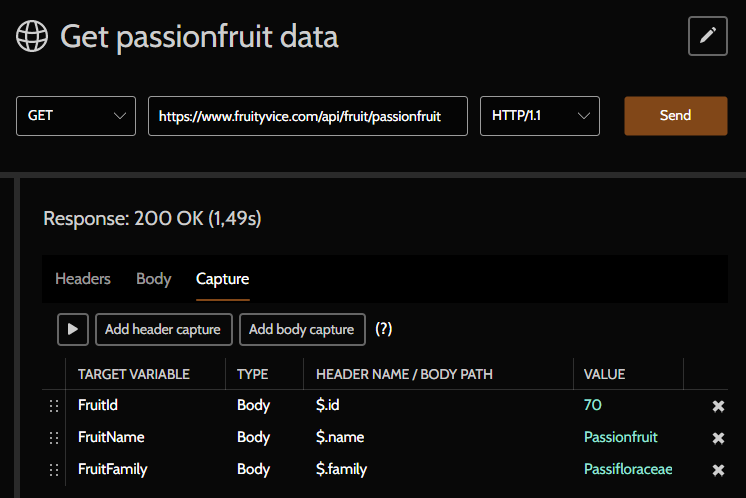
A capture takes the value of an HTTP response and saves this value in a variable of the current environment. If no environment is active, then the variable will be saved into the collection variables.
If it's not possible to capture a value in a response, the variable's value remains unchanged.
Header captures
They are based on the name of the header whose value will be captured.
JSON body capture
It is applied when the response has a JSON Content-Type.
The capture syntax is similar to other languages: $ means root (start object or array), .myProp means accessed field, [0] means 1-th item of the accessed array.
Consider the following JSON:
{
    "id": 18,
    "name": "Miyagi",
    "items": [
        {
            "objectId": 1,
            "product": "Laranja"
        },
        {
            "objectId": 2,
            "product": "Acerola"
        }
    ]
}
Some examples of captures and values below:
| Body path | Value |
|---|---|
$.id | 18 |
$.name | Miyagi |
$.items.count() | 2 |
$.items[0] | { "objectId": 1, "product": "Laranja" } |
$.items[0].objectId | 1 |
$.items[0].product | Laranja |
$.items[1].objectId | 2 |
$.items[1].product | Acerola |
If the root object is an array, the indexation also applies:
[
    {
        "id" : 186
    },
    {
        "id" : 244
    }
]| Body path | Value |
|---|---|
$.count() | 2 |
$[0].id | 186 |
$[1].id | 244 |
$.first().id | 186 |
$.last().id | 244 |
$[0] | { "id": 186 } |
$[1] | { "id": 244 } |
XML body capture
It is applied when the response has a XML Content-Type.
The syntax used is XPath 1.0.
Consider the following XML:
<A>
  <B>qwerty</B>
  <C>
    <D>uiop</D>
  </C>
</A>
Some examples of captures and values below:
| Body path | Value |
|---|---|
/A/B | qwerty |
/A/C/D | uiop |
Example of a XML with namespaces and prefixed nodes:
<?xml version="1.0" encoding="UTF-8"?>
<env:Envelope xmlns:env="http://schemas.xmlsoap.org/soap/envelope/" xmlns:wsa="http://www.w3.org/2005/08/addressing">
    <env:Body>
        <xsi:response xmlns:xsi="http://www.w3.org/2001/XMLSchema-instance">
            <wsa:MyVal1>Roraima</wsa:MyVal1>
            <xsi:Value>
                <wsa:MyVal2>123987456</wsa:MyVal2>
            </xsi:Value>
        </xsi:response>
    </env:Body>
</env:Envelope>
If the XML has nodes with namespace prefixes, the capture might be a bit more complicated and in some cases, the XPath function local-name() may be used to ignore prefixes.
Examples of captures and values below:
| Body path | Value |
|---|---|
/env:Envelope/env:Body/xsi:response/wsa:MyVal1 | Roraima |
/env:Envelope/env:Body/xsi:response/xsi:Value/wsa:MyVal2 | 123987456 |
/*[local-name()='Envelope']/env:Body/xsi:response/wsa:MyVal1 | Roraima |
The online tool xpather.com can aid you to analyse and debug XPath captures.